 Victor Arias
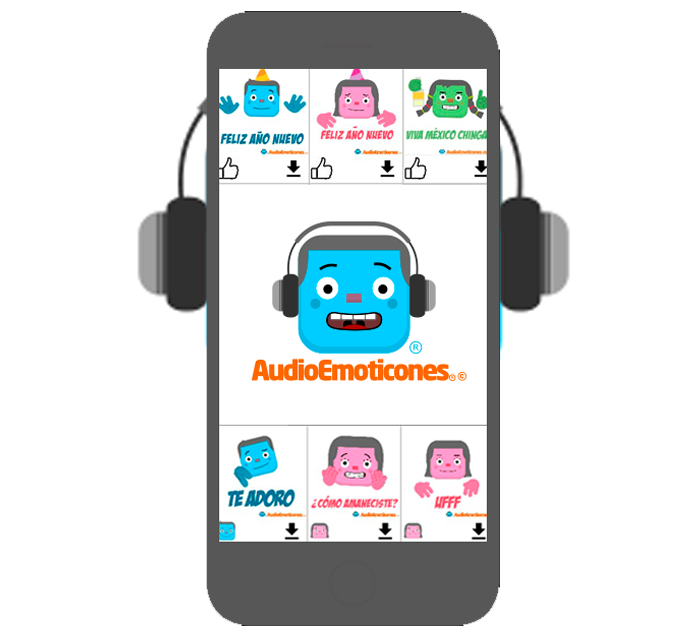
AudioEmoticones is an Android keyboard that replaces the system one and adds emoticons that play a sound when sent: packs are downloaded from the app, user preferences sync across devices and the team publishes the catalog from its own dashboard. The backend runs on AWS, held up through more than 100,000 downloads and cut latency by 35%.
| Client | AudioEmoticones |
| Industry | Android keyboard app |
| Service | Cloud Services |
| Stack | Android app, AWS, Cloud backend, Keyboard with audio emoticons, Downloadable packs, Preference sync, Content dashboard |
| Duration | 1-2 months |
| Our role | Cloud infrastructure and backend on AWS for the Android keyboard: downloadable emoticon packs, preference sync across devices, scaling for download peaks and a content dashboard. |
| Published | January 10, 2023 |
A keyboard does not end with the app you install: if the product includes downloadable content, every pack that arrives has weight, gets updated and has to be available without users noticing a wait while they type. The cloud stops being support and becomes part of the product.
AudioEmoticones is an Android keyboard with emoticons that play a sound when sent, running on a cloud backend on AWS: downloadable packs, preference sync across devices and a dashboard of its own to publish the catalog. The system held up through more than 100,000 downloads and cut latency by 35%.
The challenge: content that downloads and updates itself
A keyboard with its own catalog has three fronts open at once: serving the content, preserving the user's setup and letting the team publish without depending on anyone. All three go through the backend, not the app.
Content has weight
Packing every emoticon into the initial install would make the app bigger and force an update with every novelty. Serving them from the cloud keeps the first download light and lets the catalog grow later, without touching the installed app.
Users expect to find their own setup
Anyone who changes phone or also uses a tablet expects their configuration to be where they left it. If preferences live only on the device, every change means starting over, and in a daily-use app that shows up immediately.
Publishing cannot depend on the app store
When the catalog is the product, the speed at which you publish it matters: if every new emoticon requires a store-reviewed update, any campaign arrives late. The team needs to publish on its own and see the result the same day.
The solution: a cloud backend on AWS
The backend was built on AWS, with the downloadable pack service, preference sync and a dashboard from which the team publishes the catalog. The infrastructure was sized for download peaks and monitored from the start.
 The keyboard has to respond instantly: content that downloads must not be noticeable while typing.
Downloadable packs served from the cloud
Emoticons arrive in packs the app downloads and stores on the device, served from the cloud. That keeps the initial install light and lets the catalog grow or change without publishing a new version in the app store.
Preference sync across devices
User preferences are stored in the backend, so changing phone or using a tablet does not mean reconfiguring anything. It is a quiet feature: it is only noticed when missing, and when missing it becomes a reason to uninstall.
Content dashboard and automatic scaling
The team publishes and retires emoticons from its own dashboard, without depending on anyone and without waiting for reviews. At the same time, the AWS infrastructure scales when a download peak arrives, so a successful launch does not turn into an outage.
How we implemented it in one to two months
The project started by measuring the app's real behaviour: how long it takes to serve a pack, what gets downloaded most and how many people coincide at the peaks. Those numbers sized the infrastructure and set the latency target.
 Audio is the part of the product where a late or half-delivered piece of content is most noticeable.
Measuring latency before touching anything
Before changing infrastructure we measured how long the app took to serve each piece of content. Without that figure you cannot tell whether the problem is the cloud, the app or the size of the pack, and you end up optimizing blind.
Publishing a test pack end to end
The whole flow was tested with a real pack: creating it, publishing it from the dashboard, downloading it on a clean device and checking that it appears in the keyboard. That is the test proving the team can publish on its own, without touching the app or waiting for anyone.
Results
The project was delivered with the pack service running, preference sync and the content dashboard in operation. These were the needs and how they were solved:
| Need | How it was solved |
| Serving emoticons without bloating the app | Downloadable packs served from the cloud |
| Users keeping their configuration | Preference sync across devices |
| Publishing content without updating the app | Content dashboard owned by the team |
| Holding up through download peaks | Automatic scaling on AWS |
| Keeping the keyboard instant | 35% lower latency |
The measured results of the project: more than 100,000 downloads and 35% lower latency. Both figures explain each other: content is served from the cloud so the app does not carry extra weight, and it responds fast because the infrastructure is sized for real demand.
What an app with downloadable content needs
If your app delivers content and not just features, these are the points that decide whether it holds up:
- Content served from the cloud, so the initial install stays light and the catalog grows without updating the app.
- Downloadable packs with a reliable download, because a half-delivered pack shows up in daily use.
- Preference sync, so changing device is not starting from scratch.
- A dashboard to publish content without depending on the app store or on third parties.
- Infrastructure that scales when the content suddenly becomes popular.
- Measured latency, not assumed: it is what users feel in every interaction with the app.
If your app delivers content and you want the cloud to stop being the bottleneck, our cloud services page explains how we work, and you can write to us to go through it together.
Frequently asked questions
What is particular about a keyboard with downloadable content?
That the product is not only the keyboard: it is the catalog behind it. Every pack has weight, gets downloaded and gets updated, so the app depends on the cloud to serve content without bloating the initial install and without users noticing a wait while typing.
Why sync preferences across devices?
Because users who change phone or use a tablet expect to find their setup as they left it. If preferences live only on the phone, every device change means starting over, and that is reason enough to uninstall.
What does a content dashboard of your own add?
Publishing and retiring emoticons without touching the app or waiting for an app store update. In a content app that is the difference between reacting to a campaign within a day or waiting around for store review.
How long does an app with a cloud backend take?
This project was delivered in one to two months. The schedule is set by the downloadable pack service, preference sync, the content dashboard and sizing the infrastructure for download peaks.