 Victor Arias
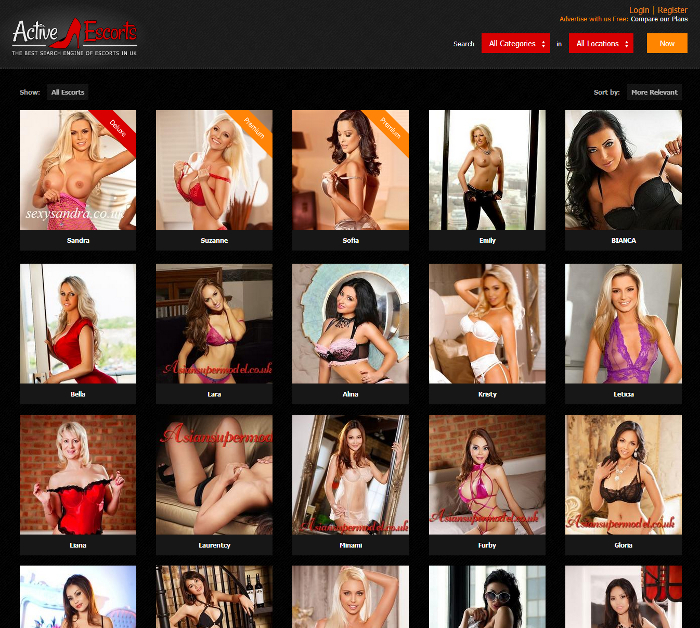
Active Escorts is a dating catalog built on WordPress with a custom theme and modules: every profile publishes its photos and description from its own panel, visitors search and filter and send their enquiry from the profile page, and all content is moderated before it goes live. The project was delivered in four to six weeks, with over 200 bookings a month and 50% less load time.
| Client | Active Escorts |
| Industry | Dating catalog |
| Service | WordPress Development |
| Stack | WordPress, PHP, MySQL, Custom theme, Booking and enquiry module, Content moderation before publishing, Search and filters, Performance optimisation (images and caching) |
| Duration | 4-6 weeks |
| Our role | Development of the catalog on WordPress: custom theme, profile pages, booking system, content moderation, search with filters and load-time optimisation. |
| Published | January 9, 2019 |
A profile catalog does not look like a company website: the content is not written by the brand, it is published by hundreds of people who sign up, upload their photos and expect their profile to appear. That detail changes everything else: how you publish, how people search and how you control what is visible.
Active Escorts was built on WordPress with a custom theme and modules: a panel for every profile, a booking system, moderation before publishing and performance work that made loading 50% faster. The project was delivered in four to six weeks, with over 200 bookings a month.
The challenge: a catalog that grows with third-party content
When the content is published by users, the work is not in writing pages, it is in building the rules that let hundreds of profiles live together without the site running out of control and without visitors getting lost looking for something.
The content is uploaded by outsiders
Every profile wants to publish its photos, description and details, and wants to do it alone, without waiting for someone to lay it out. That forces you to solve sign-ups, permissions and limits: what each one can edit and what they cannot, and what happens when something breaks the rules.
Visitors have to find and book
A catalog only works if visitors arrive, filter and get in touch in a few steps. If finding a profile means scrolling through entire listings, or if booking forces them out of the page to copy details by hand, interest is lost along the way.
Hundreds of profiles with photos are heavy
A profile catalog is above all images: every profile carries several and the listing shows many at once. Without performance work, that becomes a site that is slow on the very first screen, which is where visitors decide whether to stay.
The solution: WordPress with a custom theme and modules
We started from WordPress and built the theme and the pieces that make a catalog work: the profile page with its own panel, the booking system, moderation before publishing and optimisation of pages with many images.
 In a catalog, photos are the content: every profile publishes its own and the site has to show them without the page becoming slow.
Profile page and its own panel
Every profile has its page and its panel: they log in, update their photos and details and see their profile published without depending on the administrator. That is what lets the catalog grow on its own, with nobody adding each profile by hand.
Bookings from the profile page itself
Visitors send their enquiry from the profile they are looking at, with the profile details already loaded. The less they have to copy and the fewer screens they switch, the more enquiries arrive complete.
Moderation before publishing
Nothing goes live without review. Pre-publication moderation is what keeps the catalog clean: it prevents duplicates, incomplete profiles and content that breaks the rules, and protects the site from carrying material that should not be visible.
How we implemented it in four to six weeks
The project was organised around two ideas: publishing rules and page weight. With the rules clear and images treated as part of the build, the rest was the visible layer of the catalog.
 Performance is not a final tweak: it is worked from the template, with images optimised and served at the right size.
Publishing rules first, design afterwards
Before drawing anything we defined what fields a profile has, who can edit what and at which point review comes in. Those are the rules holding up a catalog open to third-party content, and changing them later means rebuilding half the site.
Performance: images, caching and template weight
Images were optimised and are served at the size each spot on the page needs, caching was added and the weight of the listing and profile templates was reviewed. That is the work you notice on the first screen and what explains the drop in load time.
Results
The catalog was delivered with profile sign-up, booking and moderation working. These were the needs of the project and how they were solved:
| Need | How it was solved |
| Every profile publishing without depending on anyone | Profile page with its own panel |
| Visitors getting in touch without leaving the page | Booking and enquiry system from the profile |
| What is published following the rules | Moderation before publishing |
| Finding what you are looking for | Search and filters by city and features |
| The catalog loading fast with hundreds of photos | Optimised images, caching and light templates |
The measured results of the project: over 200 bookings a month and 50% less load time. The two figures support each other: a catalog that is slow to load loses visits before anyone sees anything, and a profile nobody finds generates no bookings at all.
What a catalog with profiles and bookings needs
If your project is a catalog with third-party content, these are the points that decide whether it works:
- Sign-up and a panel for every profile: if publishing depends on the administrator, the catalog does not grow.
- Bookings or enquiries from the profile page, with details already loaded and no steps in between.
- Moderation before publishing: third-party content either gets reviewed or becomes a problem.
- Search and filters built around what people actually look for, not around the order of the listing.
- Performance worked from the template: optimised images, caching and light pages.
- Clear publishing rules: which fields are required and what cannot be published.
If your project is a catalog rather than a site with fixed pages, our WordPress development page explains how we work, and you can write to us to go through it together.
Frequently asked questions
What makes a profile catalog different from a regular website?
That you do not write the content: profiles publish it, each with their own photos, description and details, and each has to be able to manage their own without touching the rest. That forces you to solve sign-ups, permissions, search and moderation, none of which exist on a site with fixed pages.
Why is content moderation essential in a catalog?
Because the content is uploaded by outsiders and published on your domain. Moderation reviews every profile before it becomes visible, so what appears follows the rules and the site does not fill up with duplicate, incomplete or outright fake profiles.
How do you make a catalog with lots of photos load fast?
By treating images as part of the build rather than a final detail: they are optimised and served at the right size, caching is added and the weight of each template is reviewed. In a catalog with hundreds of profiles with photos, that work is the difference between a fast site and one abandoned before it loads.
How long does a catalog with profiles and bookings take?
This project was delivered in four to six weeks. The schedule is set by the pieces that must be solved: sign-up and the panel for each profile, the booking system, moderation and the performance work on pages with images.