 Victor Arias
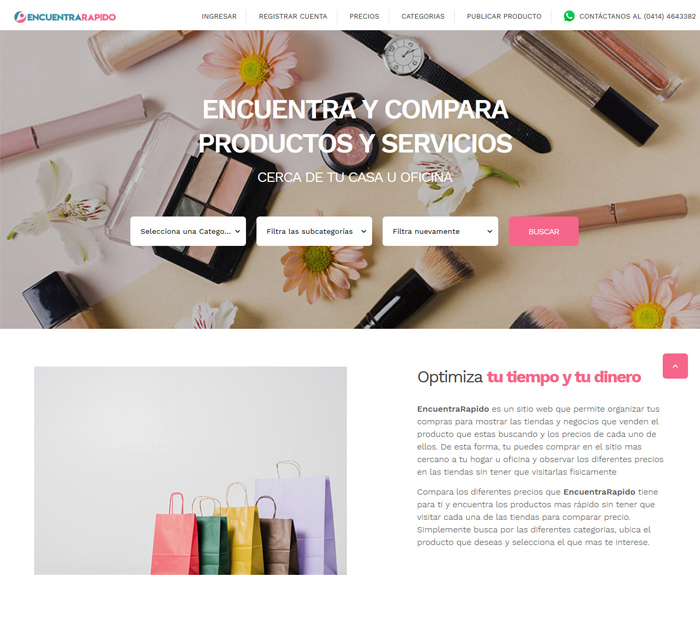
EncuentraRápido is a price comparison directory built on WordPress with custom development: stores register and publish their products, users search by category and subcategory and compare the price of the same product across nearby stores, and the platform is funded by paid plans for those who publish. After the project organic traffic rose 65% and management time dropped 40%.
| Client | EncuentraRápido |
| Industry | Price comparison directory |
| Service | WordPress Development |
| Stack | WordPress, PHP, MySQL, Custom theme, Search with filters and subcategories, Product publishing by store, Price comparison, Paid plans, Admin panel |
| Duration | 1-2 months |
| Our role | Custom development on WordPress for the directory: a bespoke theme with account registration, product publishing by store, search with category and subcategory filters, price comparison between nearby stores, paid plans, store contact and an admin panel. |
| Published | May 14, 2024 |
Comparing prices looks like a feature, but it is really a data structure problem: for the same product to appear in several stores at different prices, someone has to have decided beforehand what each category is called and how each price is stored.
EncuentraRápido is a price comparison directory built on WordPress with custom development: stores register and publish their products, users search by category and subcategory and compare the price of the same product across nearby stores, and the platform is funded by paid plans for those who publish. After the project organic traffic rose 65% and management time dropped 40%.
The challenge: comparing prices requires well-ordered data
A comparison directory serves two audiences with different interests — the store that wants a shop window and the user who wants the best price — and one shared requirement: the information has to be organised so both find what they need without help.
The same product in several stores
That is what separates a comparison site from a catalog. The product does not belong to one store: it exists in several, each with its own price and availability. If the structure only allows one price per product, comparison is impossible and the directory stays a listing.
People search by category
Nobody compares what they cannot find. The real journey is specific: the person knows which product they want and needs to reach it in a few steps, filtering by category and subcategory until they see the stores that carry it. Every extra step is a comparison that never happens.
An empty directory helps nobody
As with any site that depends on third-party content, the start is the delicate moment: without stores there are no products to compare, and without products there is no reason for a store to publish. The model has to make publishing easy and sustain itself.
The solution: WordPress with custom development
The base is WordPress because the site lives on publishing and organising content, and custom development adds what no template covers: store registration, a price per store for each product, search with subcategories, paid plans and a panel to manage categories, products and users.
 The search decides: if the filter does not lead to the exact product, the user stops before reaching the comparison.
Store registration and product publishing
Each store registers with its own account and publishes its products, with price and details. The store does not depend on the portal's team to appear, and the team does not become a bottleneck limiting how much the catalog can grow.
Search with filters and price comparison
The search filters by category and subcategory down to the specific product, and each page shows which stores carry it and at what price, with each store's location so users know which one is close. That is the journey that gives the directory its point: find, compare and decide where to buy.
Paid plans, contact and admin panel
Paid plans fund the portal and set the terms with whoever publishes. Users can contact the store from the product page itself, and the admin panel makes it possible to manage categories, products and users without technical help.
How we implemented it in one to two months
The project started with the data structure, not the design: how categories are organised, how a product relates to several stores and how each price is stored. That is what keeps comparison working as the directory grows.
 Behind every listing there is a local business: the directory gives it a shop window without needing a website of its own.
Defining category and subcategory before design
The tree of categories and subcategories was agreed before building, because the search, the filters and the way stores publish all depend on it. Changing it later means rearranging products and rebuilding the filters.
Preparing the search for real use
The filters were tested with products from different categories to check that the journey works with a small catalog and keeps working as it grows. A search that only gets it right with a few products is no use for a directory, which exists precisely for when there are many.
Results
The site was delivered with store registration, product publishing, filtered search, price comparison, paid plans and the admin panel working. These were the needs and how they were solved:
| Need | How it was solved |
| Letting stores publish without depending on the team | Account registration and product publishing |
| Finding the product among hundreds | Search with category and subcategory filters |
| Comparing the same product across stores | Price and details per store on each listing |
| Knowing which store is nearby | Store locations on every product |
| Funding the directory | Paid plans for the stores that publish |
| Managing categories, products and users | Admin panel |
The measured results of the project: organic traffic rose 65% and management time dropped 40%. Both figures explain themselves: a directory ordered by categories and subcategories attracts specific searches from search engines, and letting each store publish frees the team from entering products by hand.
What a price comparison directory needs
If your project gathers products from several stores so users can compare, these are the points that decide whether it works:
- A structure of categories and subcategories, because the search, the filters and publishing all depend on it.
- A price per store, not a single price: that is what turns a listing into a comparison.
- Search that reaches the exact product, since nobody compares what they cannot find.
- Store locations, because anyone looking close to home needs to know where each one is.
- Registration and self-service publishing, so the catalog grows without adding work for the team.
- Paid plans, which align the store's interest with the portal's and keep the project running.
If your idea brings products from several stores together, our WordPress development page explains how we work, and you can write to us to go through it together.
Frequently asked questions
How is a price comparison site different from a catalog?
In a catalog the seller sets the price and the product lives in one place. In a comparison site the same product appears in several stores at different prices, so the data structure has to allow it from the start: categories, subcategories and a price per store, not a single price.
How do you keep a directory like this alive?
By having stores publish constantly. That is why paid plans matter so much: they align the interest of whoever publishes — having a shop window — with the portal's, and stop the directory from depending on someone on the team entering products by hand.
Why is search with subcategories the key piece?
Because nobody compares what they cannot find. Users do not browse a whole directory: they type or filter until they reach the specific product, and only then do they compare prices. If the filter stops halfway, the journey ends before the comparison.
How long does a price comparison directory take?
This project was delivered in one to two months. The schedule is set by account registration, product publishing by store, search with filters and subcategories, price comparison, paid plans and the admin panel.