 Victor Arias
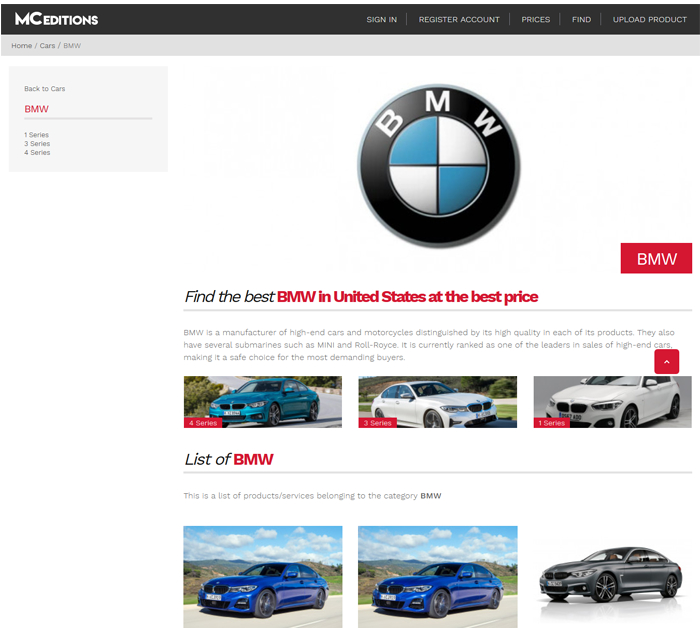
MCEditions is a vehicle catalog built on WordPress with a custom theme and modules: visitors filter by make, model and year, open the technical spec page with the vehicle gallery and request a quote from the same page, and the team publishes and retires vehicles from its own panel. The project was delivered in four to six weeks and generated over 160 leads a month.
| Client | MCEditions |
| Industry | Vehicle catalog |
| Service | WordPress Development |
| Stack | WordPress, PHP, MySQL, Custom theme, Advanced filters (make, model and year), Technical specs and gallery per vehicle, Quote request module, Vehicle management panel, Performance optimisation |
| Duration | 4-6 weeks |
| Our role | Development of the catalog on WordPress: advanced filters, technical specs and gallery per vehicle, quote requests, vehicle management panel and load-time optimisation. |
| Published | December 10, 2019 |
A vehicle catalog has two traits almost no other business has: every unit is unique — no two cars are the same — and inventory turns over every week. That shapes how people search, how vehicles are shown and how the catalog is kept up to date.
MCEditions was built on WordPress with a custom theme and modules: advanced filters, a technical spec page with a gallery per vehicle, quote requests from the same page and a panel to publish and retire vehicles. The project was delivered in four to six weeks and generated over 160 leads a month.
The challenge: a catalog that turns over every week
Selling vehicles online means selling unique, changing stock. Buyers arrive with a fairly settled idea of what they want and the catalog has to answer quickly, because if their combination is not on the first screen, they go somewhere else.
Buyers filter, they do not browse
Nobody scrolls through an entire listing of vehicles: people arrive with a budget, a make and a use in mind. The work is not in showing more cars, it is in having the filter leave only what fits on screen, because that is what turns a visit into an enquiry.
Every vehicle is unique
Two cars of the same model can have different equipment, mileage or condition, and that changes the price. The spec page cannot be a template of generic features: it has to tell what makes that particular car different, with its real photos.
Inventory changes all the time
Units come in, get reserved, sell and are retired. If one person maintains the catalog by hand, the site ends up showing cars that are gone, and every call becomes a clarification instead of a sale.
The solution: WordPress with a custom theme and modules
We started from WordPress and built the theme and the pieces that hold up a vehicle catalog: the filters, the spec page with its gallery, the quote flow and the management panel for the team.
 Every vehicle is a distinct unit: the page has to tell what makes that car unique, not what it shares with the model.
Advanced filters: make, model and year
Visitors cross the criteria they actually use — make, model, year and price range — and the list narrows to the real options. A well-built filter saves buyers their first ten searches, which is exactly where visits are lost.
Spec page with its own gallery
Every vehicle has its page with technical specs, equipment and condition, and its own photo gallery. That is what lets buyers form a real idea before writing: the less uncertainty, the more useful enquiries arrive.
Quote requests from the same page
Interested buyers ask for their quote without leaving the page they are looking at, with the vehicle already identified. The fewer steps and the less they have to copy, the more enquiries arrive complete and the easier they are to answer.
How we implemented it in four to six weeks
The project was organised around two ideas: that the team could maintain the catalog on its own and that pages with many photos would not become slow. With that solved, the visible part of the catalog was the quick bit.
 A catalog that turns over needs autonomy: publish, update and retire without depending on anyone.
Management panel: publish and retire without depending on anyone
The team adds a vehicle, uploads its photos and retires it once sold, all from the same panel. That is the piece keeping the catalog true to reality and the one preventing every change from going through the developer.
Performance: galleries that do not slow the page down
Galleries were treated as part of the build: optimised images, served at the right size and cached. In a catalog where every page carries several photos, that work decides whether the page is seen or abandoned.
Results
The catalog was delivered with filters, spec pages and inventory management working. These were the needs of the project and how they were solved:
| Need | How it was solved |
| Buyers seeing only what fits | Advanced filters by make, model and year |
| Understanding each vehicle without calling | Spec page with equipment and condition |
| Showing what is for sale properly | A photo gallery for every vehicle |
| Asking for a price without friction | Quote request from the same page |
| The catalog not showing sold cars | Own panel to publish, update and retire |
The measured result of the project: over 160 leads a month. It is the figure that sums up the work, because when buyers find what they are looking for, understand what they are getting and can ask for a price without switching screens, the catalog stops being a shop window and starts generating enquiries.
What a vehicle catalog needs
If you sell vehicles and want the catalog to work for you, these are the points that decide whether it does:
- Filters by make, model and year: that is how buyers search, not how the lot is organised.
- A complete spec page with the equipment, condition and mileage of that specific unit.
- A photo gallery per vehicle, because a car is bought with the eyes before the spec sheet.
- Quote requests from the page itself, with no steps in between and nothing to copy by hand.
- A panel to publish, update and retire: inventory turns over and the site has to turn over with it.
- Performance looked after on pages with many images, which is every page in the catalog.
If your catalog changes every week and you want to maintain it without depending on anyone, our WordPress development page explains how we work, and you can write to us to go through your case.
Frequently asked questions
What does a vehicle catalog need in order to sell?
Three things: filters that understand how buyers search, a page with the information that decides the purchase —technical specs, equipment, condition and photos— and a direct way to ask for a price. If any of the three is missing, visitors go to another catalog to finish their search.
Why are filters the most important part of a vehicle catalog?
Because nobody scrolls through an entire listing: buyers arrive with a budget, a make and a use in mind, and want to see only what fits. A well-built filter by make, model and year turns a long list into three or four real options, and that is what makes them ask for a quote.
How do you manage a catalog that changes every week?
With its own panel: the team publishes a vehicle, updates its photos and details and retires it once sold, without depending on anyone. In a business where inventory turns over, that autonomy is what stops the site from showing cars that are no longer available.
How long does a vehicle catalog take?
This project was delivered in four to six weeks. The schedule is set by the filters, the spec page with its gallery, the quote flow and the performance work on pages with many images.